Menus

Tuesday, November 6, 2012

How to save images into folder and images path in database and display images from folder in gridview based on images path in database using asp.net

Introduction:

In this article I will explain how to insert images into our project folder and display the images from folder in gridview based on images path in database using asp.net.

Description:
How to insert images into our project folder and insert images path into database and display images in gridview from images folder based on Images path in database. For that first create new website after that right click on your website and add new folder and give name as Images because here I used same name for my sample if you want to change folder name you need to change the images folder name in your code behind also first design table in your database like this to save images path in database.


Column Name
Data Type
Allow Nulls
ID
int(set identity property=true)
No
ImageName
varchar(50)
Yes
ImagePath
nvarchar(max)
Yes
 

Now Design your aspx page like this

<html xmlns="http://www.w3.org/1999/xhtml">
<head runat="server">
<title>Save Images In Folder and Display Images in Gridview from folder</title>
<style type="text/css">
.Gridview
{
font-family:Verdana;
font-size:10pt;
font-weight:normal;
color:black;
}
</style>
</head>
<body>
<form id="form1" runat="server">
<div>
<asp:FileUpload ID="fileuploadimages" runat="server" />
<br />
<asp:Button ID="btnSubmit" runat="server" Text="Submit" onclick="btnSubmit_Click" />
</div>
<div>
<asp:GridView runat="server" ID="gvImages" AutoGenerateColumns="false" DataSourceID="sqldataImages" CssClass="Gridview" HeaderStyle-BackColor="#61A6F8" >
<Columns>
<asp:BoundField DataField="ID" HeaderText="ID" />
<asp:BoundField DataField="ImageName" HeaderText="Image Name" />
<asp:ImageField HeaderText="Image" DataImageUrlField="ImagePath" />
</Columns>
</asp:GridView>
<asp:SqlDataSource ID="sqldataImages" runat="server"  ConnectionString="<%$ConnectionStrings:dbconnection %>"
SelectCommand="select * from ImagesPath" >
</asp:SqlDataSource>
</div>
</form>
</body>
</html>
 
After completion of aspx page design add using System.IO; reference in codebehind and write the following code

protected void btnSubmit_Click(object sender, EventArgs e)
{
//Get Filename from fileupload control
string filename = Path.GetFileName(fileuploadimages.PostedFile.FileName);
//Save images into Images folder
fileuploadimages.SaveAs(Server.MapPath("Images/"+filename));
//Getting dbconnection from web.config connectionstring
SqlConnection con = new SqlConnection(ConfigurationManager.ConnectionStrings["dbconnection"].ToString());
//Open the database connection
con.Open();
//Query to insert images path and name into database
SqlCommand cmd = new SqlCommand("Insert into ImagesPath(ImageName,ImagePath) values(@ImageName,@ImagePath)", con);
//Passing parameters to query
cmd.Parameters.AddWithValue("@ImageName", filename);
cmd.Parameters.AddWithValue("@ImagePath", "Images/" + filename);
cmd.ExecuteNonQuery();
//Close dbconnection
con.Close();
Response.Redirect("~/Default.aspx");
}
 
After that set your database connection in web.config like this because we are using this connection in our sqldatasource to get the data from database
 
<connectionStrings>
<add name="dbconnection" connectionString="Data Source=SureshDasari;Integrated Security=true;Initial Catalog=MySampleDB"/>
</connectionStrings >


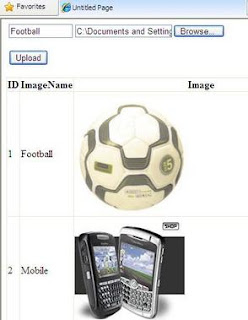
FileUpload Save Images In Database In ASP.NET

This example explains how to Save Images In Sqlserver Database In Asp.Net Using File Upload Control.
I am Uploading Images using FileUpload Control and saving or storing them in SQL Server database in ASP.NET with C# and VB.NET.


FileUpload Save Images In Database In ASP.NET

Database is having a table named Images with three columns.
1. ID Numeric Primary key with Identity Increment.
2. ImageName Varchar to store Name of picture.
3. Image column to store image in binary format.

After uploading and saving images in database, pics are displayed in GridView.


Html markup of the page look like
<form id="form1" runat="server">
<div>
<asp:TextBox ID="txtName" runat="server" Width="95px">
</asp:TextBox>
<asp:FileUpload ID="FileUpload1" runat="server"/>
<asp:Label ID="lblMessage" runat="server">
</asp:Label>
<asp:Button ID="btnUpload" runat="server" 
            OnClick="btnUpload_Click" Text="Upload"/>
</div>
</form>

Write this code in Click Event of Upload Button
C# Code behind
protected void btnUpload_Click(object sender, EventArgs e)
{
 string strImageName = txtName.Text.ToString();
 if (FileUpload1.PostedFile != null &&
     FileUpload1.PostedFile.FileName != "")
  {
   byte[] imageSize = new byte
                 [FileUpload1.PostedFile.ContentLength];
  HttpPostedFile uploadedImage = FileUpload1.PostedFile;
  uploadedImage.InputStream.Read
     (imageSize, 0, (int)FileUpload1.PostedFile.ContentLength);

 // Create SQL Connection
  SqlConnection con = new SqlConnection();
  con.ConnectionString = ConfigurationManager.ConnectionStrings
                         ["ConnectionString"].ConnectionString;

 // Create SQL Command

 
 SqlCommand cmd = new SqlCommand();
 cmd.CommandText = "INSERT INTO Images(ImageName,Image)" +
                   " VALUES (@ImageName,@Image)";
 cmd.CommandType = CommandType.Text;
 cmd.Connection = con;

 
 SqlParameter ImageName = new SqlParameter
                     ("@ImageName", SqlDbType.VarChar, 50);
 ImageName.Value = strImageName.ToString();
 cmd.Parameters.Add(ImageName);

 
 SqlParameter UploadedImage = new SqlParameter
               ("@Image", SqlDbType.Image, imageSize.Length);
 UploadedImage.Value = imageSize;
 cmd.Parameters.Add(UploadedImage);
 con.Open();
 int result = cmd.ExecuteNonQuery();
 con.Close();
 if (result > 0)
 lblMessage.Text = "File Uploaded";
 GridView1.DataBind();
 }
}

Saturday, November 3, 2012

Create dynamically link inside the gridview

Introduction: Hello guys, in this article i will explain that how we can give the link to the label inside the  gridview. This article is very helpful for the .net developers,

Implementation: Create a page  named grid. Place gridview  at this page.
Code for .aspx page:
<head runat="server">
    <title>Gridview</title>
   
</head>
<body>
    <form id="form1" runat="server">
  
 
                <asp:GridView ID="GridView1" runat="server" AutoGenerateColumns="False"
                    BackColor="LightGoldenrodYellow" BorderColor="Tan" BorderWidth="1px"
                    CellPadding="2" ForeColor="Black" GridLines="None">
                    <FooterStyle BackColor="Tan" />
                    <Columns>
                        <asp:TemplateField HeaderText="School Name">
                            <ItemTemplate>
                                <asp:Label ID="lbl_schoolname" runat="server" Text='<%# Eval("schoolname") %>'></asp:Label>
                            </ItemTemplate>
                        </asp:TemplateField>
                        <asp:TemplateField HeaderText="Address">
                            <ItemTemplate>
                                <asp:Label ID="lbl_address" runat="server" Text='<%# Eval("address") %>'></asp:Label>
                            </ItemTemplate>
                        </asp:TemplateField>
                        <asp:TemplateField HeaderText="School Website">
                            <ItemTemplate>
                                <asp:Label ID="lbl_website" runat="server"></asp:Label>
                            </ItemTemplate>
                        </asp:TemplateField>
                    </Columns>
                    <PagerStyle BackColor="PaleGoldenrod" ForeColor="DarkSlateBlue"
                        HorizontalAlign="Center" />
                    <SelectedRowStyle BackColor="DarkSlateBlue" ForeColor="GhostWhite" />
                    <HeaderStyle BackColor="Tan" Font-Bold="True" />
                    <AlternatingRowStyle BackColor="PaleGoldenrod" />
                </asp:GridView>


</form>
</body>

Code for aspx.cs page:
using System;
using System.Collections;
using System.Configuration;
using System.Data;
using System.Linq;
using System.Web;
using System.Web.Security;
using System.Web.UI;
using System.Web.UI.HtmlControls;
using System.Web.UI.WebControls;
using System.Web.UI.WebControls.WebParts;
using System.Xml.Linq;
using System.Data.SqlClient;

public partial class viewstate : System.Web.UI.Page
{
    // here i am declaring some object for datatable,SqlConnection,SqlDataAdapter
    DataTable dt;
    SqlConnection cnn = new SqlConnection();
    SqlDataAdapter adp;
    protected void Page_Load(object sender, EventArgs e)
    {
        //  here i am declaring  connectionstring
        cnn.ConnectionString = ConfigurationManager.ConnectionStrings["con"].ConnectionString;
        cnn.Open();
        //  here i am open the connection if the connection is closed
        if (cnn.State == ConnectionState.Closed)
        {
            cnn.Open();
        }
        if (Page.IsPostBack == false)
        {
            // here i am calling the function that will bind the gridview
            grd_bind();
        }
    }


    private void grd_bind()
    {
        // inside the table there are many  schools those have website and there are some schools  those have no webdsite.
        // so at below i m  using case statement in the sql query. if any school have website then school_website retun value 'view site'
        // otherwise school_website retun value 'N.A' means not available
 adp = new SqlDataAdapter(@"select schoolname ,address,
( case when website='' then 'NA'else 'View Site'  end ) as  school_website,
 website  from school", cnn);
             
        dt = new DataTable();
        // here i m filling the dt with the values those will come inside the SqlDataAdapter adp
        adp.Fill(dt);
        adp.Dispose();
        // here i am checking the rows those will come inside the dt
        if (dt.Rows.Count == 0)
          {
              // if  there will be no any row come inside the dt then GridView1.Visible=false
             GridView1.Visible = false;
                   
          }
          else
          {
              // if  there will any row come  inside the dt then gridview's visible will true and
            // here i am binding  the gridview with the dt
              GridView1.Visible = true;
              GridView1.DataSource = dt;
              GridView1.DataBind();
              // here i am using the for loop to display the value inside the label that will come inside the school_website colimn
              Int32 i;
              for (i = 0; i <= dt.Rows.Count - 1; i++)
              {
                  // this for loop  come the no of the times. this no: depends on the value comes inside the Rows.Count
                  // here i am declaring a string variable named website
                  // and m binding this variable with the value that will come inside the school_website column
                  // there will be two types of the value 'N.A' or 'viewsite'
                  String website = (dt.Rows[i]["school_website"].ToString());

                  if (website == "View Site")
                  {
                      //if inside the website 'view site' will come then this condition will work
                      // here i am finding the label from the gridview and bind the label with the value come inside the
                      //website means 'view Site' and attaching the <a> tag and givind the path that will come
                      // inspde the website column  of the table
                       ((Label)GridView1.Rows[i].FindControl("lbl_website")).Text = "<a href=" + dt.Rows[i]["website"].ToString() + " target=_blank>" + dt.Rows[i]["school_website"].ToString() + "</a>";
                  }
                  else if (website == "NA")
                  {
                      //if inside the website 'N.A' will come then this condition will work
                      // bind the label with the 'N.A' and there will be no <a> with this
                      ((Label)GridView1.Rows[i].FindControl("lbl_website")).Text = dt.Rows[i]["school_website"].ToString();
                  }
              }   
          }
    }
}
 See output in this image:


Sql Script for database:
/****** Object:  Table [dbo].[school]    Script Date: 11/16/2011 23:49:53 ******/
IF  EXISTS (SELECT * FROM sys.objects WHERE object_id = OBJECT_ID(N'[dbo].[school]') AND type in (N'U'))
DROP TABLE [dbo].[school]
GO
/****** Object:  Table [dbo].[school]    Script Date: 11/16/2011 23:49:53 ******/
SET ANSI_NULLS ON
GO
SET QUOTED_IDENTIFIER ON
GO
IF NOT EXISTS (SELECT * FROM sys.objects WHERE object_id = OBJECT_ID(N'[dbo].[school]') AND type in (N'U'))
BEGIN
CREATE TABLE [dbo].[school](
      [id] [int] IDENTITY(1,1) NOT NULL,
      [schoolname] [varchar](50) COLLATE SQL_Latin1_General_CP1_CI_AS NULL,
      [address] [varchar](50) COLLATE SQL_Latin1_General_CP1_CI_AS NULL,
      [website] [varchar](50) COLLATE SQL_Latin1_General_CP1_CI_AS NULL,
 CONSTRAINT [PK_school] PRIMARY KEY CLUSTERED
(
      [id] ASC
)WITH (PAD_INDEX  = OFF, STATISTICS_NORECOMPUTE  = OFF, IGNORE_DUP_KEY = OFF, ALLOW_ROW_LOCKS  = ON, ALLOW_PAGE_LOCKS  = ON)
)
END
GO
SET IDENTITY_INSERT [dbo].[school] ON
INSERT [dbo].[school] ([id], [schoolname], [address], [website]) VALUES (1, N'D.A.V', N'Batala', N'http://www.dav.org/')
INSERT [dbo].[school] ([id], [schoolname], [address], [website]) VALUES (2, N'S.L.BAwa', N'Batala', N'http://www.facebook.com/')
INSERT [dbo].[school] ([id], [schoolname], [address], [website]) VALUES (3, N'R.R.Bawa', N'Batala', N'http://www.rrbawa.org/')
INSERT [dbo].[school] ([id], [schoolname], [address], [website]) VALUES (4, N'G.N.D.U', N'Amritsar', N'')
INSERT [dbo].[school] ([id], [schoolname], [address], [website]) VALUES (5, N'D.A.V Collage', N'Amritsar', N'http://www.dav.org/')
INSERT [dbo].[school] ([id], [schoolname], [address], [website]) VALUES (6, N'Sainik Collage', N'Gursadpur', N'')
INSERT [dbo].[school] ([id], [schoolname], [address], [website]) VALUES (7, N'D.A.V Collage', N'Pathankot', N'http://www.aman.org/')
INSERT [dbo].[school] ([id], [schoolname], [address], [website]) VALUES (8, N'D.A.V Collage', N'Batala', N'http://www.usingaspdotnet.blogspot.com/')
INSERT [dbo].[school] ([id], [schoolname], [address], [website]) VALUES (9, N'D.A.V Collage', N'Moga', N'http://www.asp.org/')
INSERT [dbo].[school] ([id], [schoolname], [address], [website]) VALUES (10, N'D.A.V Collage', N'Pathankot', N'http://www.jpj.org/')
INSERT [dbo].[school] ([id], [schoolname], [address], [website]) VALUES (11, N'D.A.V Collage', N'Gursadpur', N'http://www.yahoomail.com/')
SET IDENTITY_INSERT [dbo].[school] OFF


Conclusion
Through this article, you have learned give the link to the label inside the gridview.